
Download LockItTight – PC security, remote monitoring, theft protection, location tracking, keystroke logging, screenshot capture, webcam monitoring
Overview
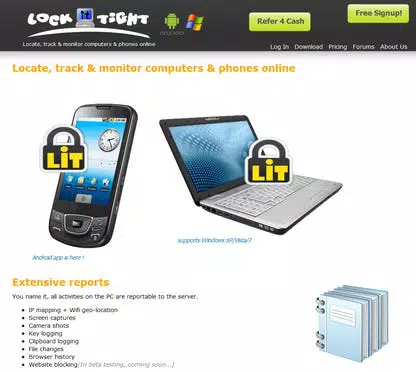
LockItTight is a security-focused utility designed to safeguard personal computers against theft and unauthorized access. The application operates as a remote monitoring tool, enabling users to track their PC’s real-time location, capture screenshots, record webcam images, and log keystrokes and clipboard activity. These capabilities are particularly valuable for individuals who rely on their devices for sensitive work, personal data storage, or frequent travel. The app is especially relevant in environments where physical device security is difficult to maintain, such as public spaces, shared offices, or remote work setups. By leveraging a free online service, LockItTight provides a web-based console where users can access security logs and monitor device activity from any internet-connected device. This allows for immediate response in case of suspicious behavior or loss. The tool is not intended for surveillance of others but is positioned as a protective measure for users who need to recover or verify the integrity of their own systems. While the developer did not provide additional technical details about the app’s architecture or data handling, the core functionality centers on remote visibility and evidence collection. The app’s role in the broader security ecosystem is significant, particularly for users seeking low-cost, accessible tools to supplement traditional antivirus and firewall protection. It fills a niche in personal device security by offering real-time tracking and behavioral monitoring—features typically found in more complex enterprise-grade solutions. Although the freeware version lacks encryption and includes ads, the core functionality remains accessible at no cost, making it a viable option for budget-conscious users.Key Features & Functionality
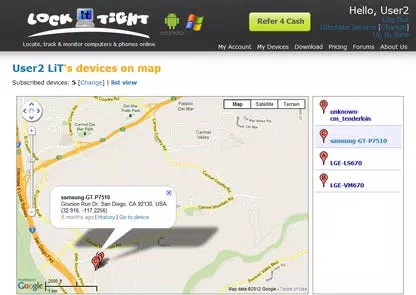
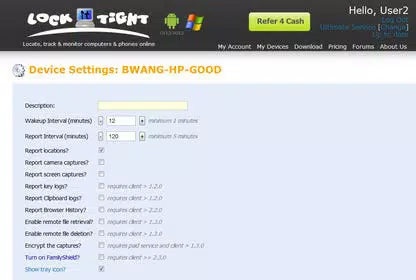
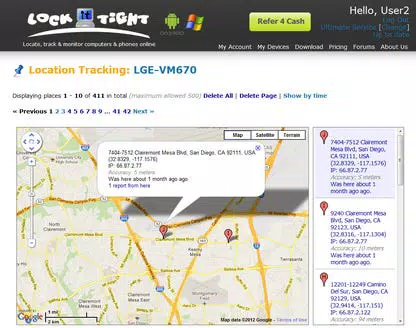
LockItTight offers a suite of security-focused tools designed to enhance control and visibility over a user’s PC. The primary feature is real-time PC location tracking, accessible through a web-based console. This allows users to pinpoint the geographical location of their device, which can be critical in cases of theft or accidental loss. The map interface provides a visual representation of the device’s last known position, aiding in recovery efforts. Another key capability is the automatic capture of screenshots and webcam images. When the PC is accessed without authorization, the app can take visual snapshots of the screen and, if the webcam is active, capture images of the individual using the device. These visual records may help identify intruders and serve as evidence in reporting incidents. The tool also logs keystrokes and clipboard data, providing insight into what information may be entered or copied during unauthorized sessions. This includes sensitive inputs like passwords or personal messages, which could be vital for assessing the extent of a breach. All collected data—location, screenshots, webcam images, keystrokes, clipboard entries, and browser history—is compiled into a centralized security log within the web console. Users can review these logs at any time to assess activity patterns and detect anomalies. While the free version does not encrypt captured data or the web interface, the paid upgrade offers enhanced privacy and ad-free access. These features collectively empower users to monitor and respond to potential threats with greater confidence.- Real-time PC location tracking via web console
- Automatic screenshot capture of unauthorized activity
- Webcam image capture when the camera is active
- Keystroke logging for sensitive input monitoring
- Clipboard data recording for tracking copied content
- Centralized web-based security log with access to all captured data
- Free online service with optional paid upgrade for encryption and ad removal
Interface, UX & Performance
The user experience of LockItTight is centered around its web-based console, which serves as the primary interface for monitoring and managing device activity. The console is designed to be intuitive, with a clean layout that organizes data into clear categories such as location, screenshots, webcam images, keystrokes, and clipboard logs. Navigation is straightforward, allowing users to access historical records and real-time updates without requiring technical expertise. The desktop client, installed on the user’s PC, operates in the background with minimal visual footprint, ensuring it does not interfere with daily workflows. Although the developer did not list formal performance metrics, the app’s lightweight design—evidenced by its 10.2 MB file size—suggests it consumes minimal system resources. Users can expect stable operation across various Windows device categories, including laptops, desktops, and tablets, though specific compatibility details were not disclosed. Responsiveness is a key strength, with data updates appearing promptly in the web console after capture events. The app maintains consistent performance during continuous monitoring, though prolonged use may depend on network stability and device configuration. The developer did not provide information on battery impact or background activity optimization, but the low file size and background operation imply efficient resource management. Although the developer did not specify minimum OS requirements or detailed performance benchmarks, the app’s design suggests compatibility with modern Windows systems. Users can expect a smooth experience on devices with standard processing power and internet connectivity. Overall, the interface prioritizes clarity and accessibility, making it suitable for non-technical users who need reliable security oversight.Platform Compatibility & Technical Requirements
LockItTight is available exclusively for the Windows platform, targeting users of desktop and laptop systems running Windows operating systems. The current version is 1.0.0, with a file size of 10.2 MB, indicating a lightweight installation that should not significantly impact storage space. The app is offered as a free download, with no cost associated with installation or basic functionality. The developer did not specify minimum OS requirements, nor did they list compatibility details for older or newer Windows versions. Similarly, no information was provided about processor architecture, RAM, or disk space requirements. This lack of detail means users should proceed with caution when installing on non-standard or legacy systems. The app’s dependency on a stable internet connection for remote monitoring and data synchronization is implied but not formally stated. Given the app’s reliance on background processes and access to sensitive hardware like the webcam and keyboard, users should ensure their system settings allow for such permissions. While the developer did not clarify whether administrative rights are required, it is common for such tools to require elevated privileges for full functionality. The absence of platform-specific details limits the ability to assess broad compatibility, but the app’s small size and Windows-only focus suggest it is optimized for mainstream desktop environments.Pros and Cons
- Free to download and use with core security features available at no cost
- Real-time PC location tracking helps in theft recovery and device monitoring
- Visual evidence collection through screenshots and webcam images
- Keystroke and clipboard logging for monitoring sensitive activity
- Web-based console provides centralized access to all security logs
- Lightweight installation (10.2 MB) with minimal system impact
- Available for Windows devices without requiring additional hardware
- Free version does not encrypt captured data or the web console
- Web interface in the free version includes advertisements
- Developer did not provide detailed system requirements or OS compatibility
- Functionality relies on consistent internet connectivity
- No information on data retention policies or server-side storage duration
- Privacy implications may arise if used on shared or public devices


